TRIPPING THE LIGHT FANTASTIC
Add a touch of pizzazz to your media center with a border of colorful, picture-reactive LEDs
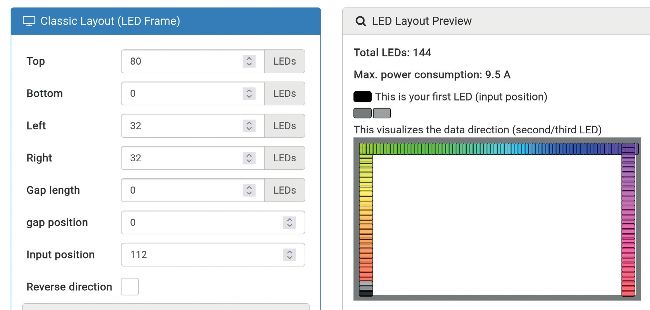
Use the LED Numbers button to tell Hyperion the Input Position (where the LED strip starts).
© HYPERION
YOU MIGHT HAVE SEEN the Ambilight system found on some Philips TVs, sometimes also known as Bias Lighting. The idea is quite simple: a perimeter of RGB LEDs is fixed to the back of the television, which lights up in correspondence with what’s happening on screen. This has the effect of extending the image onto the walls behind the screen. There are several approaches to recreating this system with open source tools and plugging this into Kodi. The most popular is called Hyperion, which has been around for about as long as Ambilight TVs. Hyperion is flexible and a common setup is to have Kodi running on a device, say your PC, and connected to an HDMI splitter and capture device. The HDMI capture is then sent via USB to a Pi running Hyperion, which drives the LEDs.
That setup is a little complicated for our liking, so we thought we’d try and come up with our own, ideally with fewer moving parts. Annoyingly, there’s no way to run everything on a Pi 4, since no one has figured out how to reliably capture the frame buffer. So to use the latest Kodi, we’d need to invest in some capture hardware, either in the form of a loop capture (if we were to do everything on the Pi) or separate splitter and capture devices (if the Pi is just running the LEDs). Both of these can be achieved for under £20 with a search on Amazon.