DOCTOR
THIS MONTH THE DOCTOR TACKLES...
>Test For Corrupt RAM
>Ventoy Gets Blocked
>Laptop Won’t Boot
Random Freeze Part 2
Hi Doc, regarding my earlier email about random freezes, by the time you responded, the whole PC had broken down: When I power on, the fans light up, and so does the RGB, but nothing else lights up, and the ROG logo does not light up when the machine is off. It was supposed to be on all the time.
About the corrupt RAM, I have seen several blue screens with the stop codes "SYSTEM_THREAD_NOT_ HANDLED" and some other memory management error. I mainly play Terraria and Geometry Dash on the PC. I could try buying a new set of RAM from a different manufacturer, or is it the mobo? Finally, to answer your earlier question, I have a 750W PSU.
Rector-Stingray
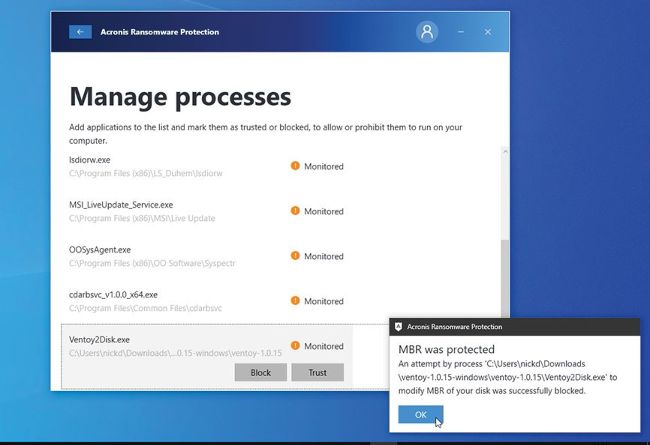
Instruct Acronis Ransomware to trust Ventoy.
THE DOCTOR RESPONDS: At first glance, the blue screen errors would suggest that your RAM is the problem, but it might also point to a failing drive (or even just a drive that needs a good run-through with the Disk Check tool). The fact your PC appears to have “broken down” would point towards the RAM, processor, or motherboard, though -key components required for the PC to get as far as the POST screen. The Doc can’t give you a definitive answer as to which is the culprit, but he can show you the steps he’d follow in your position.
First, the cheapest and easiest component to test is the RAM-and the blue-screen errors would suggest this is the best place to start. If your PC could get beyond the POST screen, we’d recommend you create a Memtest86 bootable flash drive (www.memtest86.com) on another PC, then boot from that to grill your RAM and hopefully confirm the diagnosis with test failures.