THE SCIENTIFIC METHOD
Need a number-crunching monster in order to work from home? We’ve got you covered
LET’S MAKE ONE THING CLEAR
: We’re not scientists. We’re just slotting things into motherboards and praying it works, then writing funny words about it. We leave unraveling the mysteries of the universe to those smarter and better trained than us.
But we are pretty darn good at building PCs, and we’ve had requests from the more scientifically minded of our readership for a tutorial on how to build a powerful home PC designed to work on data analysis, statistical modelling, and any other scientific endeavor. With lockdowns in effect, many of us learned to work from home, which is fine and dandy if you’re a writer but a problem if you need access to a lab. Those among you with a need to process huge datasets asked for a machine that could do that work from the comfort of your study, and here’s our answer.
It’s going to be expensive! We need two key things here: A truckload of RAM, and a high-end processor with as many cores as we can muster. This will enable our system to handle millions of points of data, making it capable of performing heavy-duty tasks such as training deep-learning models on consumer data, or analyzing massive amounts of data.
Graphics are an interesting point of debate when it comes to data-science systems. You need to know exactly what sort of programs you’re going to be using on the machine-if you’re running visualization or 3D-rendering software, a more powerful GPU is a must. If you need a system to just perform thousands of complex mathematical calculations, the GPU becomes less important. We’ll be using a relatively high-end graphics card in this build, but our main focus is the CPU and memory.
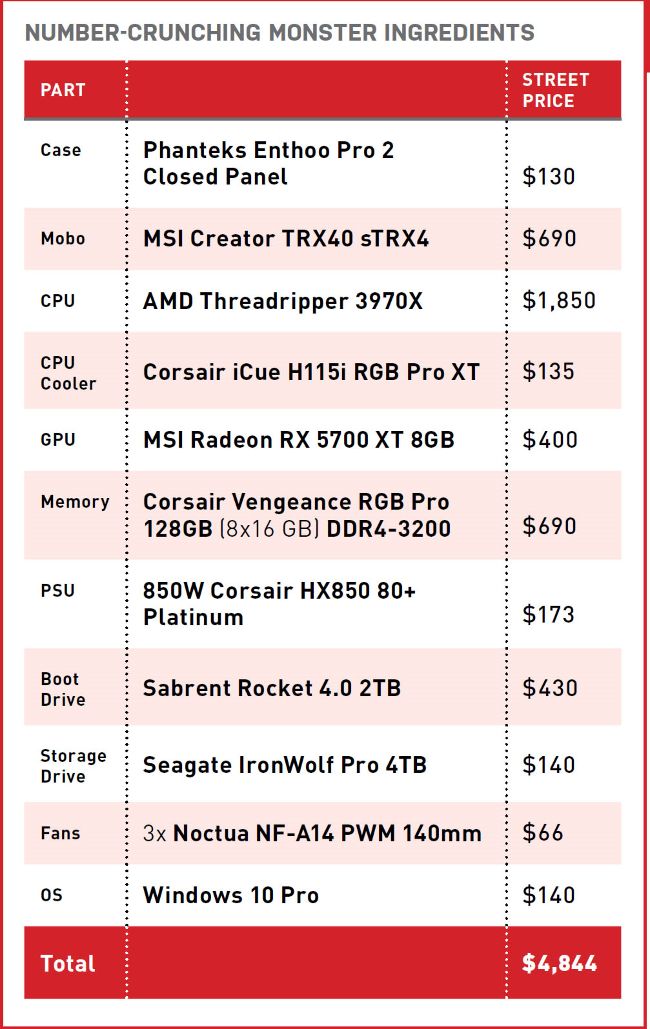
What else do we need? Well, a pricey processor demands a pricey motherboard, and we also need a hefty power supply to keep this system running. Liquid cooling for our processor is also a must-have, and we’d advise that you do the same even if you want to spend less. If you’re handling lots of data, you’ll need plenty of storage, so we’ll be using a high-speed M.2 SSD as our boot drive, and also including a larger HDD for secondary storage. To contain all this, we need a professional-looking PC case with good airflow and USB-C support for faster data transfers.
So it’s darn expensive, like we said, but we’ll go over some more affordable alternatives later on. This is essentially the best version of this machine we can build, but it’s a build you can tailor to your needs; if it’s overkill, cheaper components will work just fine.
CHRISTIAN GUYTON
PRICES CORRECT AT THE TIME OF PRINTING
BUILD IT 26
GPU $400
MSI RADEON RX 5700 XT 8GB
As we said, we’re not going overboard with the GPU. If you already know that you need graphical power above all else, then you might want to consider a cheaper CPU paired with a more expensive graphics card, such as a GeForce RTX 2080 Super, or 2080 Ti. For our purposes here, though, the RX 5700 XT is a powerful mid-range card, easily capable of supporting multiple monitors and most visualization software. A last-minute price cut on the RX 5000 cards before their release means that they’ve always been great-value multipurpose GPUs, so the XT with 8GB of VRAM is the obvious logical choice for us here.
© MSI, CORSAIR, PHANTEKS
RAM $690
CORSAIR VENGEANCE RGB PRO 128 GB (8 X 16 GB) DDR4-3200
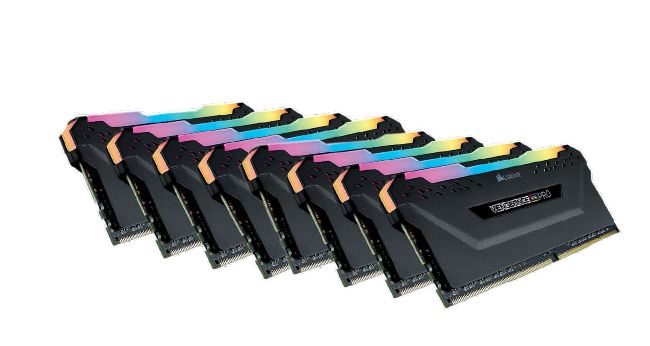
Corsair is a reliable choice when it comes to memory, not least when buying an eight-DIMM kit like this. That’s eight different components that could go bust, and you’re going to be grateful for that lengthy warranty if they do. They shouldn’t, though. The Vengeance RGB Pro is an excellent option, and we can opt for the 8x16GB configuration thanks to our mobo’s eight memory slots. RGB lighting isn’t really needed here, but this memory is high-performance and good value for a 128GB kit. 3200MT/s memory speed and a CAS latency of 16 gives us plenty of speed to work with our powerful AMD processor, too.
CPU $1,850
AMD THREADRIPPER 3970X
Yowch! Yes, the price tag is a kick in the shins, but the Threadripper 3970X is undeniably one of the most powerful processors on the market right now. We didn’t spring for the 64-core 3990X (it costs almost as much as this entire build!) but thanks to AMD’s simultaneous multi-threading technology it still packs 64 threads.
This is a formidable processor, and it does force the use of an expensive TRX40 motherboard, but this chunky chip will handle whatever you throw at it. You can’t have a supercomputer in your house, but this might be the closest you can get.