Why You MUST Bin YOUR OLD ROUTER
An outdated Wi-Fi router puts every device you connect to your home network at risk. Robert Irvine explains the benefits of switching to a faster, safer and more versatile model
Your router is the gateway between the internet and all the devices connected to your home network – whether wirelessly or through Ethernet cables. This means it’s essential that your router is as fast, reliable and secure as possible, enabling you to quickly get online no matter where you are in your home.
WHAT YOU CAN DO
• Protect your network against hackers and malware
• Boost your Wi-Fi signal to eliminate all dead spots
• Connect all your devices to your Wi-Fi network
• Direct your signal precisely to the appropriate hardware
• Prevent network congestion and interference
• Check which versions of Wi-Fi your PC supports
Yet many of us pay little attention to this essential piece of hardware, and stick with old routers that are long past their peak performance. A survey by Broadband Genie last year found that 89 per cent of UK web users have never updated their router’s firmware (www. snipca.com/53336).
Upgrading your router will not only improve the speed and security of your home network, but allow you to benefit from all the recent advances in Wi-Fi technology – and there have been many. The router supplied by your ISP, or that you bought 10 years ago, may still do its job, but switching to a new model will move your network into the fast lane.
In this feature, we tell you why you should ditch your old router, and what you should buy to future-proof your wireless network. We explain the advantages and disadvantages of Wi-Fi 6 and 7 (and 6E), as well as the differences between them, and demystify technical terms such as beamforming.
5 REASONS YOU MUST BIN YOUR ROUTER
1 It’s vulnerable to hackers
Over the past year, routers have frequently been targeted by hackers or found to contain security flaws that leave them vulnerable to attacks. In November, DrayTek fixed critical flaws in more than 700,000 of its routers (www.snipca. com/53268), and earlier in the year Asus patched vulnerabilities in 21 models (www.snipca.com/53267).
Serious flaws were also discovered in routers from D-Link (www.snipca. com/53271) and Netgear (www. snipca.com/53270) – though these were discontinued models such as the WNR614 (pictured right). Worst of all, in April it was reported that unpatched TP-Link routers were being bombarded with botnet and malware attacks (www. snipca.com/53269), and US authorities are now investigating the company (see page 8).
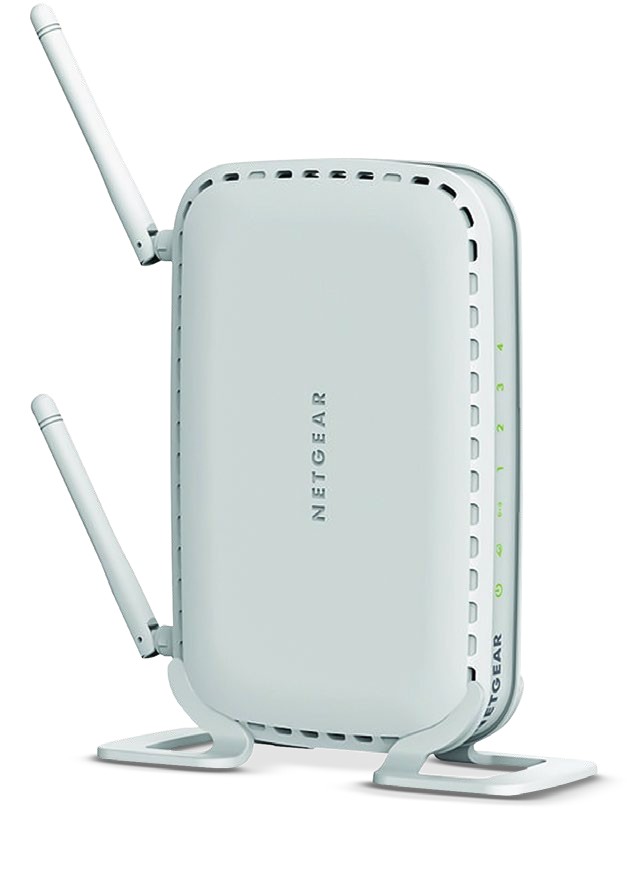
The Netgear WNR614 was found to have six serious security flaws
Although manufacturers are usually quick to release security updates that fix these flaws, your router is unlikely to receive them if it’s reached its end-of-service support. Old and discontinued models are easy targets for hackers, who exploit their vulnerabilities to infiltrate your home network, spread malware and steal sensitive data.
What’s more, older routers don’t support Wi-Fi Protected Access Version 3 (WPA3). Developed by the Wi-Fi Alliance in 2018, this encrypted security protocol helps protect the data sent to and from devices over your network.
2 Its signal is slow and unreliable
Most old routers are either Wi-Fi 4 (802.11n) models, which use the 2.4GHz and/or 5GHz bands, or Wi-Fi 5 (802.11ac), which works over 5GHz. The 2.4GHz band has wider coverage, while 5GHz is faster and provides more channels.
Regardless of your router’s band, the strength, range and reliability of its signal can deteriorate over time due to problems with the device itself. Its firmware may be outdated and no longer receiving updates from the manufacturer; its built-in storage may be almost full; and external factors such as dust, heat and knocks may have damaged its components – including the all-important antennas.
All these factors can make your router much slower and less efficient than when you bought or received it, giving you a good incentive to upgrade.
3It can’t support all your devices
We now connect more devices than ever to our Wi-Fi networks. These include phones, tablets, laptops, TVs, streaming sticks, smart doorbells, security cameras, smart speakers, and heating and lighting systems.
Older routers will struggle to provide a strong signal to all these gadgets simultaneously, especially if they’re using the same band and channels. Not only are Wi-Fi 6 (802.11ax) routers (and newer) compatible with more recent devices, they also use a technology called orthogonal frequency division multiple access (OFDMA – see screenshot below) to sub-divide their channels. This lets them direct fast signals to many devices all at once.