GB
  
You are currently viewing the United Kingdom version of the site.
Would you like to switch to your local site?
23 MIN READ TIME

Cover Feature

HACK YOUR MAPS!

Improve your navigation by exploring the best new and secret tools in mapping websites and apps. Robert Irvine reveals 20 free ways to make maps work better for you

Online maps have improved our lives far more than any streaming service or social network. No more struggling with unwieldy road maps, thumbing through street guides and stopping strangers to ask for directions. Now we can simply type our destination and receive instant information on how to get there, how long it will take and where we can grab a coffee on the way.

Google Maps, which celebrated its 20th birthday in February, is undoubtedly the most popular online mapping service, but – as you’ll know if you remember Multimap or Streetmap – it wasn’t the first, and it certainly isn’t perfect. However, it has spurred the development of alternative navigation tools that offer greater privacy, better designs and smarter features. Google even bought one of them, Waze, in 2013.

WHAT YOU CAN DO

• Plan routes that save you money on petrol or diesel

• Find your way around using augmented reality

• Improve the accuracy of maps that cover your local area

• Turn your phone into a car dashcam

• Enhance map information using layers

• Use a digital compass to help you find your way

• Plan walking and cycling trips around the UK

• Download country maps so you can navigate while offline

With so many mapping services to choose from, it’s easy to miss some of their most useful options, either because they’re new, tucked away or only available in tools you’ve never tried (or even heard of). In this feature, we reveal our favourite new hacks for online maps to make them work better for you.

We’ve explored dozens of mapping websites and apps – from the biggest names to lesser-known navigation tools – to bring you the best free ways to enhance your journeys, whether you’re travelling by car, bike, public transport or on foot.

MAPPING TOOLS THAT SAVE YOU MONEY

Choose the most fuel-efficient routes

Google Maps now helps you save money on petrol and diesel – or electricity if you drive an electric vehicle – by recommending the most fuel-efficient route. When you search for driving directions in the Maps app, it will automatically suggest the most cost-effective route and highlight it using a leaf symbol. This is based on factors such as the number of hills, condition of the roads and predicted traffic.

To activate the feature, tap your profile picture and choose Settings, then Navigation. In the ‘Route options’ section, switch on the option ‘Prefer fuel-efficient routes’ (see screenshot above right). To get more accurate advice for your engine type, select ‘My vehicles’ in Settings and choose from Petrol, Diesel, Hybrid and Electric. Although you won’t save much on shorter journeys, on longer trips it should mean fewer stops at petrol pumps or charging points.
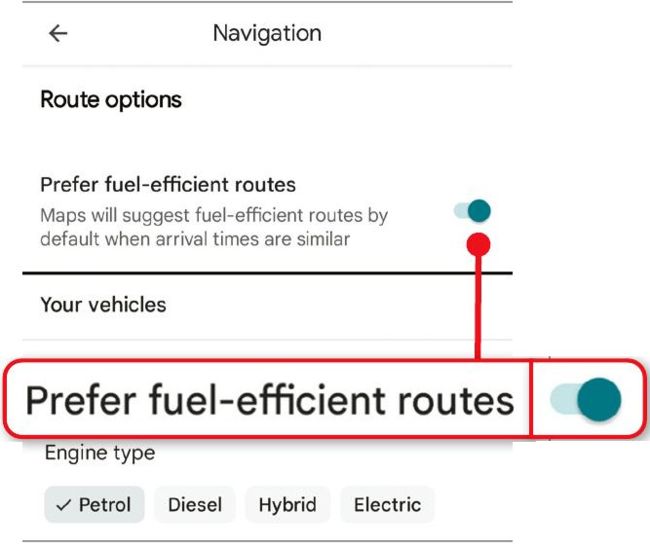
Save money on petrol by prioritising fuel-efficient routes

Calculate petrol costs in advance

Find out how much a car journey will cost by installing the browser extension Google Maps Fuel Cost Calculator(www. snipca.com/53897, Chromium browsers). Enter your vehicle’s fuel efficiency in miles per gallon ( 1 in our screenshot below) or kilometres per litre, and the current price of petrol or diesel, then click Save. When you search for driving directions on the Google Maps site, you’ll now see estimated fuel costs for different routes so you can choose the cheapest 2 .

The RAC offers a similar ‘Mileage calculator’ feature on its Route Planner website(www.snipca.com/53898). Enter the details of your journey, engine type and fuel consumption to view the cost for different sizes of vehicle.
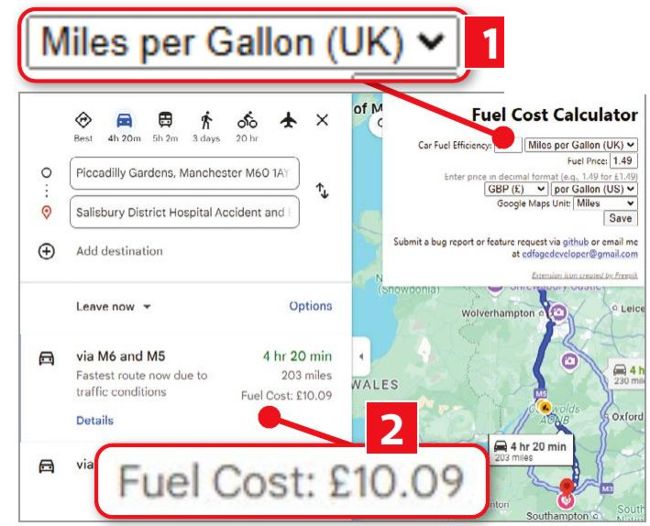
Estimate your petrol costs using Google Maps Fuel Cost Calculator

Compare fares on public transport

The excellent transport app and mapping service Citymapper(www.snipca. com/53894) now lets you compare the fares for public-transport routes around dozens of major UK and European cities. These include London, Birmingham, Lincoln, Liverpool, Edinburgh and Glasgow.

Enter your start and end points ( 1 in our screenshot below), and Citymapper will calculate the cost of your trip via different bus and rail methods 2 . The new feature works on the Citymapper website, and in its apps for Android (www.snipca. com/53895) and iOS (www.snipca. com/53896), and also tells you when and where to catch the bus duration of your journey.

Unlock this article and much more with
You can enjoy:
Enjoy this edition in full
Instant access to 600+ titles
Thousands of back issues
No contract or commitment
Try for 99p
SUBSCRIBE NOW
30 day trial, then just £9.99 / month. Cancel anytime. New subscribers only.


Learn more
Pocketmags Plus
Pocketmags Plus

This article is from...


View Issues
Computer Active
705
VIEW IN STORE

Other Articles in this Issue


Computeractive
From the Editor
I’d be lost without my maps. They tell
Have ‘Advanced’ voice chats with ChatGPT for free
Y ou can now have more natural voice
Google disables popular ad-blocker uBlock Origin
The top stories in the world of technology
Google axes old Chromecast despite no iPlayer in replacement
G oogle has stopped selling the Chromecast, leaving
Apple offers AI tools in new ‘budget’ iPhone
A pple has launched the iPhone SE, which
MICROSOFT TESTS FREE OFFICE WITH ADVERTS
Microsoft is testing a free version of Office
TOMORROW’S WORLD
Polish firm Clone Robotics calls its Protoclone robot a
UPDATE LIBREOFFICE NOW TO FIX FLAW
LibreOffice has urged anyone using version 24.8 to
Amazon launches AI version of Alexa, but it’s not free
A mazon has launched a new AI-powered version
Sky to launch cheaper Glass TVs
S ky has said it will release a
RING RELEASES FIRST 2K SECURITY CAMERA
Ring has released its first 2K security camera,
YOUTUBE TO CUT ‘DISRUPTIVE’ ADVERTS
YouTube says it will show fewer “disruptive” adverts during
THE WORLD’S GONE MAD!
Mayors of towns near Mount Etna in Sicily
Gmail users targeted in scam that combines phone and email
S ecurity experts have repeated a warning from
SEAGATE’S NEW SSD LOOKS LIKE USB STICK
Seagate has released an SSD that looks like
Amazon stops you moving ebooks by USB
A mazon has scrapped the ‘Download & Transfer
KEEP USING FIREFOX ON W7 UNTIL SEPTEMBER
Firefox will keep working on Windows 7 and 8.1
GET QLED FREELY TVs FOR UNDER £400
German manufacturer Metz has launched a range of Freely
Why does the Govt want to access your private files?
It asked Apple to disable its most advanced security protection
‘Winter Fuel Payment’ text
Readers warn readers
New tools
Lock your points on Sainsbury’s Nectar app
WATCH OUT FOR... Fake adverts promoted by celebrities
Scams and threats to avoid, plus new security tools
Letters
Tell us what’s on your mind
Council should let Howells dig for Bitcoin – but demand more money
In Issue 704 (page 8) you asked whether
Consumeractive
We stand up for your legal rights
Lidl says coupons are ‘non-refundable’ but offers help
Lidl has suggested it will refund Jenny Beady
Palicomp sent new power supply unit within 24 hours
I’ve been using Palicomp computers for about 15
Search criminal records
If your ancestors ran into trouble with the law, follow Richard Holt’s advice to…
Best Free Software
Robert Irvine recommends new programs that won’t cost you a thing
SOFTWARE WARNING!
Keumars Afifi-Sabet puts the boot into tech villains, jargon-spouting companies and software trying to trick you
Beat Microsoft’s Office price rise
Microsoft 365 subscribers are about to see a huge hike in fees just for the privilege of using of Copilot. Jonathan Parkyn explains how to beat this rise, and pay only for features you want
Boost your TV’s audio with a soundbar
If you’re struggling to hear dialogue in TV shows and films, a soundbar can help. Robert Irvine explains how they work and recommends the best models
Problems Solved
Our experts solve all your tech problems
Reader Support
Having a problem with our recommended software or
Uninstall junk from his Fire stick
Fed up with preinstalled apps hogging valuable storage space, Robert Irvine tries to…
Best Free Software
What should I download?
We advise you which software and apps to use
Reviews
Chuwi UBox AMD Ryzen 5 6600H
MINI PC ❘ £261 from Chuwi www.snipca.com/53972
HP Chromebook Plus 15.6
LAPTOP | £449 from Very www.snipca.com/53866
Oppo Pad 3Pro
TABLET | £499 from Oppo www.snipca.com/53892
Corsair EX400U
SOLID-STATE DRIVE | £190 from Scan www.snipca.com/53939
Bluetooth 6.0
What does it do? Bluetooth allows two
Tapo D235 Wired & Battery Video Doorbell
VIDEO DOORBELL | £100 from Tapo www.snipca.com/53924
Which laptop processor is best for my needs?
We solve your buying dilemmas
Cherry Xtrfy M64
MOUSE ❘ £75 from Currys www.snipca.com/53912
Inui Ergonomic Wireless Charger Stand
PHONE CHARGER ❘ £18 from Amazon www.snipca.com/53913
Sony HT-SF150
SOUNDBAR | £99 from Argos www.snipca.com/53955
DO I REALLY NEED...A router with a 10-mile range?
What is it? Australian firm Morse Micro
Buy It
Our pick of products that have won the Buy It award
Win 1 of 4… SwannBuddy4K video doorbells
Winner of a Recommended award in Issue 700
Workshops & Tips
HOW TO... Master Google’s Gemini AI chatbot
What you need: Web browser; Gemini app Time
Easily edit CSV files
What you need: Modern CSV Time required: 30
Readers’ Tips
TIP OF THE FORTNIGHT Use the new
Browser Tips
Secret settings and the best extensions
Phone and Tablet Tips
Brilliant things to do on your device
Make Windows Better
Expert tips for every version
Make Office Better
Top tips for the best office programs
Promote events with a Facebook Story
Run a club or society? Here's how your tech can make it easier
Grok
Elon Musk’s improved AI chatbot wants to steal ChatGPT’s crown
Chat
X
Pocketmags Support