GB
  
You are currently viewing the United Kingdom version of the site.
Would you like to switch to your local site?
12 MIN READ TIME

keyboard switch swap

THE GREAT KEYBORD SWITCH SWAP

KEYBOARD WORKSHOP 

We take a look at the techniques and tools needed to swap out an aftermarket keyboard’s switches for something customized

This issue, we’ve taken a look at the SteelSeries Apex 7 TKL keyboard (page 87). It is actually one of the best off-the-shelf keyboards we’ve reviewed in a long time. It scored a 9 and earned our Kick- Ass award. That is realistically the highest score any product will get at Maximum PC, as nothing is ever perfect: even if it ticked every single one of our boxes, it’s just not going to be the right fit for everyone—therefore, it can’t ever be a 10. There’s always something that can be improved upon.

The Apex 7 we received for review had Cherry MX Brown switches. These switches are a favorite for a lot of folk, but as professional writers working in tech, we often like heavier, tactile switches, and  the Browns in the Apex 7 just don’t tickle our fancy. Now, the problem we have here is that the Apex 7 is not technically “hot swappable”, but we love the keyboard so much that we want to make it our own. So, it’s time to see if we can do a switch swap.

You can change the switches on almost any keyboard. Sure, hot-swappable boards are far easier to do this with, and if you know that you want to swap switches often, we advise buying one of these (see, the Apex 7 isn’t perfect for everyone). However, on boards that are hard-soldered, you can usually change them fairly easily with just a modicum of skill and a few handy tools. Let’s get to it, shall we?

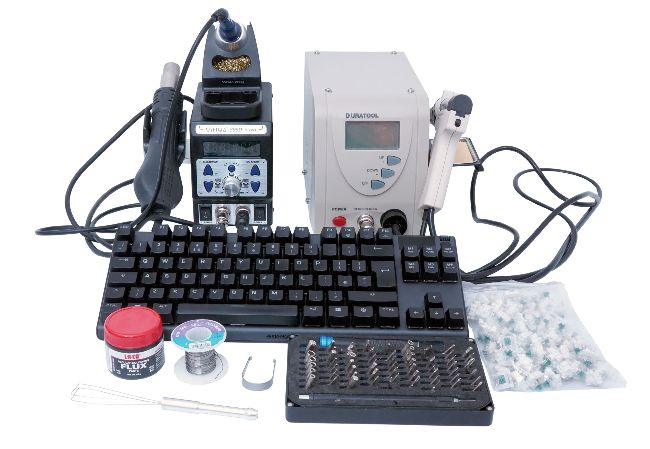
Tools of the trade, from soldering iron to flux.

Starting Out

This time around, we want to use Gateron Green switches. These are pretty much on par with Cherry MX Green switches, but we are using these ones instead of the Cherry counterpart because they’re compatible with the LEDs that SteelSeries uses in its boards. We would have loved to use some other switches, such as Sherbets or Holy Pandas or something else that’s equally fun, but alas, we again didn’t have any that were compatible with the LEDs.

Before we move onto the tools you’ll need, there is one thing to remember. When doing any modifications like this, you will void your warranty entirely, and there is absolutely a chance you could render your keyboard unusable. So if you are unsure in any way, just don’t do it.

Unlock this article and much more with
You can enjoy:
Enjoy this edition in full
Instant access to 600+ titles
Thousands of back issues
No contract or commitment
Try for 99p
SUBSCRIBE NOW
30 day trial, then just £9.99 / month. Cancel anytime. New subscribers only.


Learn more
Pocketmags Plus
Pocketmags Plus

This article is from...


View Issues
Maximum PC
March 2021
VIEW IN STORE

Other Articles in this Issue


editorial
TINKERING WITH 4K
I’VE GOT THAT ITCH again for a new
QUICKSTART
THE NEWS
World Chip Shortage
TECH TALK
Hello GPU Shortages, Again
DOCTOR
THIS MONTH THE DOCTOR TACKLES
Taking the Fight to the Millennium Bug
We sat down with a retired IT engineer to discover what it was like to face the Y2K bug
THE ULTIMATE 4K GAMING RIG
THE ULTIMATE 4K GAMING RIG
Zak Storey attempts to capture that great white whale of PC gaming
THE LUCID DREAM
MYTHICAL,  BEAUTIFUL,  LUMINOUS. TAKE  A LOOK AT OUR  CASTLE IN THE SKY
BEATING THE BUG
BEATING THE BUG
Ian Evenden discovers the history of  a problem many think never existed
HACKER’S MANUAL
HACKER’S MANUAL
Join our security expert Jonni Bidwell to learn the tricks and techniques used by hackers, and how to guard against them
HACKING THROUGH THE AGES
From phone lines to fake certificates and social engineers, hacker tradecraft has evolved spectacularly over the years
INTRODUCING KALI
Kali Linux is a powerhouse of pen-testing and security research goodness
DISRUPTING DATABASES
Get your first taste of breaking something in the form of a deeply vulnerable web application
DSHIELD PI HONEYPOT
Use a Raspberry Pi to trick hackers into thinking they’ve found a juicy target, then study them like ants in a jar
R&D
HOW TO
STEP-BY-STEP GUIDES TO IMPROVING YOUR PC
AUTOPSY
THIS MONTH WE DISSECT
How To Use Photoshop Part 1
YOU’LL NEED THIS ADOBE PHOTOSHOP CC 2018 ONWARDS
Switch Audio Output With SoundSwitch
YOU’LL NEED THIS SOUNDSWITCH https://soundswitch.aaflalo.me/ THE BACK OF
Microsoft MSX Architecture
YOU’LL NEED THIS OPENMSX For this tutorial, grab
Get The Most Out Of Your Audio
YOU’LL NEED THIS WINDOWS 7 + Realtek Audio
IN THE LAB
The World of 3D Printing
LAB NOTES TESTED. REVIEWED. VERDICTIZED
Editor’s Pick: Pikatea Macropad
This pad is like a tiny five-switch keyboard with a weird-looking wheel on it
AMD Ryzen 5 5600X
The runt of the litter delivers where it counts
MSI Bravo 15
Not quite bravo enough
Sabrent Rocket 4 Plus 2TB
Is this really the world’s fastest N VMe SSD?
Samsung CRG9
Too much of a good thing?
Corsair 5000D Airflow
Gratuitous flexibility made manifest
Sony WH-1000XM4
If it ain’t broke don’t fix it, just tweak it?
Razer Naga Pro Wireless Mouse
One mouse (with many buttons) to rule them all?
SteelSeries Apex 7 TKL Keyboard
There are many TKL boards like it, but this one is ours
Thrustmaster eSwap Pro Controller
Just too many steps away from greatness
Raspberry Pi Pico
The smallest Raspberry Pi yet
Cyberpunk 2077
Stepping out in Night City, hoping not to get bugged
Bitwarden vs LastPass
The winner takes it all (and hides it) in the battle of the password managers
COMMENTS
LETTERS
WE TACKLE TOUGH READER QUESTIONS ON
blueprint
THE BUILDS
BUDGET THIS HAS BEEN one of the most
Chat
X
Pocketmags Support