Answers
Got a burning question about open source or the kernel? Whatever your level, email it to answers@linuxformat.com

Neil Bothwick is one of 30
clones whose hive mind solves your queries.
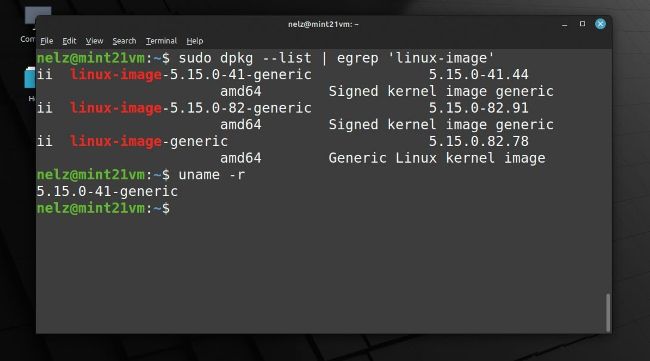
Using Dpkg in a terminal shows which kernel packages you have installed. Keep too many and /boot can overflow.
Q Fill yer boots
I cannot update the linux-firmware package on my Linux Mint 21 system. All other updates complete normally, but this errors out with the message ‘No room left to install.’ This makes no sense as I have a 1TB drive with plenty of free space. I can right-click and select Ignore The Current Update For This Package and everything appears to be running fine, but the next time, the update manager wants to update this again, with the same result.
How can I get rid of this error? If that is not possible, how can I tell the system to ignore this particular update in the hope that the next version will fix this error?
Cameron
Knowles
A Since the introduction of UEFI booting, a separate FAT formatted partition at the start of the first drive has been required to hold the bootloader. Known as the ESP (EFI System Partition), this only needs to hold the bootloader, but as distros have traditionally set up a separate partition for /boot, the most common approach is to use this for /boot as well as the ESP (the bootloader files are located in /boot/efi). Very few packages touch this partition after initial installation, except the linux-kernel packages and linux-firmware. As linux-firmware is the only package reporting space issues, it is most likely that your /boot filesystem is full. Check this in a terminal by running:
$ df -h
This shows each filesystem’s usage and it is likely that /, which occupies most of your 1TB drive, has plenty of space, while /boot is at least 99% full. How did this happen? It is because when the package manager installs an updated kernel, it does not remove the older one. This is a good thing – if there is a problem with the new kernel and your hardware, you may not be able to boot your computer, so you want the option of booting the previous kernel. All these kernels appear in the boot menu and you can see them in /boot, with names starting with vmlinuz- for the kernels and initrd.img- for the associated initial ramdisk files.