HOW IT WORKS
SLAP and FLOP
And how to avoid these vulnerabilities
YOU WILL LEARN
How these vulnerabilities in recent Macs can reveal secrets
Key fact
Only more recent Apple silicon Macs are vulnerable to SLAP and FLOP. Intel and M1 models aren’t affected as they don’t use the same methods for increasing their performance. Simply disabling these features would have serious effects on the performance of all M2, M3 and M4 chips, so Apple is expected to come up with solutions that don’t compromise their superior speed.
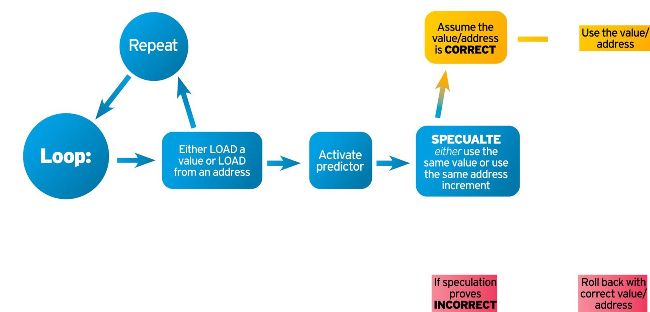
CPU cores can speculate what they’ll load from memory so they can start processing data before that’s loaded.
SLAP and FLOP may sound like kids’ entertainers, but they’re actually S data attacks that more recent Macs are susceptible to.
Let’s take a look behind the scenes. With Macs having to handle more demanding tasks like artificial intelligence (AI) and processing live high-def video, there’s a limit to the rate at which they can complete instructions, so Apple’s chip designers are using other tricks. Many aim to speed up the use of data that has to be accessed from memory.
High-speed caches help, but the cores in your Mac’s CPU can spend much of their time unproductively waiting for data from memory. That can take hundreds of core cycles and put a process on pause. CPU cores have turned to making intelligent guesses as to what instructions to run next, and what data to use, in speculative execution. Much of the time those cores have to grind relentlessly through loops of code, repeating the same instructions sometimes millions of times on data that’s either much the same, or is stored in regular patterns. To understand how their speculation works, consider an everyday example…