the ultimate creative gamer
THE ULTIMATE CREATIVE GAMER
Taking the Ryzen 7 9800X3D from Photoshop to the streets
THE WORLD of computing is wild and wonderful.
It’s a passion that can lead to so many brilliant and varied careers, from game development to creative roles. That’s why every now and then it’s nice for us to investigate the products available to those looking for something beyond the usual bombastic RGB gaming cornucopia that often dominates the landscape.
We’re looking at the perfect hybrid; a mixture of reliability, efficiency, cooling, and performance rolled into one. Asus’s ProArt line has been developed with creatives in mind. It’s built around the concept of no-fuss durability and connectivity. From its highly calibrated monitors to its top-tier componentry, when the chance arose for us to play around with something a little outside of the realm of Aorus, Strix, ROG, and MSI’s Godlike lines, we jumped at the opportunity.
The thing is, my own career wouldn’t have happened without the merging of those two passions. A drive to play
World of Warcraft
at a competitive level fostered a love of UI design and development, which spurred on a passion for creating artwork in Photoshop. That led to web design, bespoke CVs, and award-winning interfaces that played a big part in getting me to where I am today.
The ProArt series, paired with AMD’s brand new X3D chip (reviewed on page 74), feels like the perfect harmonization of those two ethoses: gaming and creativity, all married together with some intuitively designed creative products. If you’re interested in an easy, hassle-free build with top-tier componentry that can crush frame rates, as well as deliver on those creative tasks, then this is the rig for you.
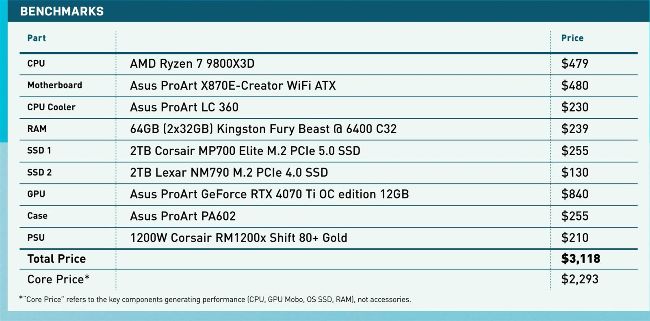
PRICES CORRECT AT THE TIME OF PUBLISHING
https://content.jwplatform.com/videos/nXhfUGUI-u2lN49He.mp4
Please type this URL into your browser if the link is broken
CPU
AMD Ryzen 7 9800X3D
It’s hard to deny just how much of a poster boy AMD’s latest Ryzen 7 9800X3D has become since its launch. Given AMD’s lackluster 9th gen debut and Intel’s dull Ultra series launch, seeing a processor arrive that actually delivered tangible gaming benefits was something of a revalation. With the very best of what Ryzen had to offer, plus Zen 5 and TSMC’s 4nm process combined with 3D cache, this chip is an appetizing pick for those looking for a CPU upgrade right now.
With eight cores, 16 threads, and a 5.2GHz maximum clock speed, the real pièce de résistance is that massive 96MB of L3 cache baked into the overall design. In the games that can leverage that, you can see some tangible benefits in frame rates and latency reductions, as the chip can store more assets directly on the die rather than offloading them to RAM.
The catch? Availability. Right now, it’s out of stock everywhere, and some unscrupulous malefactors are selling it at twice its RRP in some places, so be careful if you’re shopping around. $479, www.amd.com
Motherboard
Asus ProArt X870E-Creator WiFi ATX
The backbone of our ProArt build revolves around this sweet little number. Yep, that’s an X870E mobo adorned with Asus’s ProArt design and connectivity requirements. It’s not an official standard for the company, but if connectivity is your thing, this thing has it in spades, and for a lot less than what you’d need to pay for the equivalent ROG or Strix boards.
There’s support for twin PCIe 5.0 M.2s, plus an additional two M.2 PCIe 4.0s, a PCIe 5.0 x16 PCIe slot along with a full-fat PCIe 4.0 x16 slot, then you get support for all of AMD’s 7,000 series and above processors, along with a 16+2+2 power phase design as well.
The real crème de la crème, though? That’s the rear I/O, because this thing is seriously packing. HDMI 2.1, DisplayPort input, seven USB 10Gbps ports, two USB4 Type C ports, one 20Gbps Type C port, plus WiFi 7, and both 10Gb and 2.5Gb Ethernet ports, as well as the now standard three audio port standard that Asus has adopted. That’s not even considering the armada of internal ports as well that backs it all up. Simply put, if you’re on a budget, but don’t want to give up the connectivity, get this thing. $480, www.asus.com
CPU Cooler
Asus ProArt LC 360
Did you know that Asus did ProArt AIOs? No, us neither. Still, this thing, like the rest of the ProArt family, doesn’t hold much back on the cooling front. With an epic water block solution, a singular LED strip that can indicate all manner of temperatures and system laid options, the LC 360 Is really set apart thanks to its phenomenal fan inclusion.It comes as standard with three matte black Alphacool Apex Stealth metal fans. Not only do they drive some significant air pressure (4.46 mmh2O at 3,000 RPM and 39.5 dB(A)), they also feature entirely metal housing, and a 100,000 hours mean time to failure.
Combine all that in a $230 package, and this thing’s a treat.
$230, www.asus.com
RAM
64GB (2x32GB) Kingston Fury Beast @ 6400 C32
It wouldn’t be a creative system with only 32GB of RAM now, would it? When it comes to our creative endeavors, capacity trumps all. The more RAM available, the faster 4K video files will render. Speed doesn’t hold quite the same weight as capacity in that regard.
Still, we didn’t want a lack of speed. With a 6,400MT/s transfer rate, these Kingston sticks should saturate Zen 5’s memory controller, delivering juicy performance.
Kingston’s Fury Beast line are breaking the mold on our otherwise RGB-less build, but a software tweak later, and we’ll get these shining white and matching the rest of the build. Combined with a solid reputation, strong warranty, and decent performance, and it’s a surefire pick. $239, www.kingston.com