Problems Solved
Our experts solve all your tech problems
PROBLEM OF THE FORTNIGHT
Can I move my old Serif PagePlus 7 program with updates to a new PC?
Q I’ve been taking your magazine for many years and hope you might be able to help. It looks as though I’m going to have to replace my Windows 10 desktop PC. I’ll be able download most of the programs I use, but I still make considerable use of Serif PagePlus 7 desktop publishing software (pictured below).
I have the original disc so I expect I can install it on to the new PC, but between the time the disc was issued and the time PagePlus was discontinued there were many updates that I downloaded. Is there any way I can locate these updates on my old PC so I can add them to the ‘factory-fresh’ program that I will have installed to the new PC from the CD-ROM?
Peter Wright
A We get loads of questions about whether or not old versions of software will or can be made to run on new PCs, or new versions of Windows – but yours hits on a particularly interesting aspect. That’s because it considers that the setup on your existing PC is different to what’s on the original disc. Indeed, with untold updates and patches applied, the factory-fresh version of PagePlus could be significantly less capable than what you currently have installed.

Older programs like Serif PagePlus 7 are easier to copy over from an older PC than modern ones
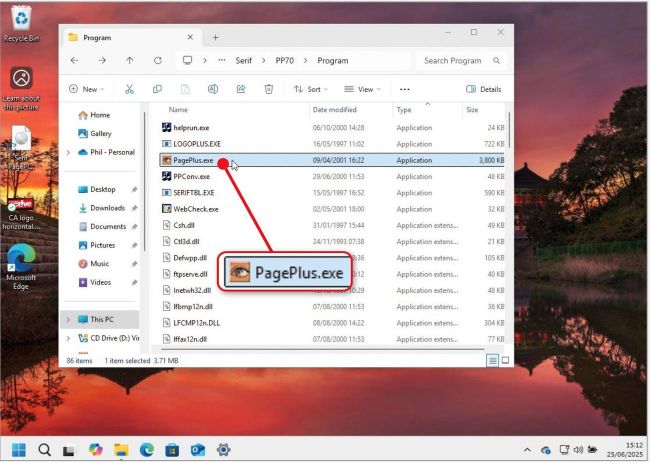
Once copied to your new PC launch Serif PagePlus 7 by double-clicking ‘PagePlus.exe’
Regardless, the fundamental problem is that PagePlus 7 (not the later X7 version) is 25 years old. Understandably, Serif no longer supports this version. As such, there is no longer any legitimate way to download either the software itself, and still less any of those many updates. And yes, while you might be able to install from the original CD-ROM, that won’t get you where you want to be.
But all might not be lost. Unlike modern programs that tend to deeply integrate with Windows via the registry and hidden support folders, older programs like this were far more self-contained. They typically lived in a single folder and didn’t scatter their files around the system the way modern software does.
So your best bet might be to bypass reinstallation altogether. We can offer no guarantees that the program itself will work in a new Windows environment, but you’re unlikely to do any harm by copying the original program folder wholesale from your old PC’s hard drive to your new one.
To do this, on your old PC, press Windows key+E to open File Explorer then navigate to the program’s installation folder — almost certainly at C:\Program Files (x86)\Serif\PP70. Copy this entire folder to a USB stick or external drive. Then, on your new PC, paste it into exactly the same location, on your C drive.
Once done, you might need to use File Explorer to navigate to a subfolder inside the Serif or PP70 folders, such as Program. Finally, launch the app by double-clicking the relevant program file, which is likely to be ‘PagePlus.exe’ (see screenshot above) or similar.